 | A two-day conference at University of Pennsylvania, November 19-20, 2010 will explore technology and medieval notation, both medieval notation as a technology in itself and new technologies used to study medieval musical manuscripts. I will be presenting on digital restorations, "bad" facsimiles (photos designed not to convey the look of the original, but instead facilitate further study), and how statistical models can help us estimate the number of French pieces of the late Middle Ages that once existed but now are lost. |
30 March 2010
Cantus scriptus: Technologies of Medieval Song

26 December 2009
Separating out Music Informatics topics
Hi all -- just wanted to mention that I've separated out the Music Informatics topics in a separate blog at http://music21-mit.blogspot.com/ . I suspect that this blog will mainly be about other musical and non-musical topics.
06 May 2009
Put figures etc. in MS Word without the "Figure" tag
One of the annoying things (at least for me) about Microsoft Word is that it wants all your figure numbers to have "Figure" prepended to them. It's all great if you always say "Figure 1" or "Figure 2" but it doesn't work if you like to say things such as "As we see in Figures 1 & 2" and not "As we see in Figure 1 and Figure 2." Furthermore, Word doesn't work well with things such as "Figure 4.12" or, my favorite, having Figure 1 followed by Example 2 followed by Table 3 -- I'm big into continuous numbering.
So here's what I finally came up with as a solution. Type whatever preface you want to appear in the caption of the document ("Figure ") and then run this macro and give your figure a short name with no spaces ("voiceRangesDunstaple" for instance), then two numbers will appear. Leave the first alone; It'll put a number after "Figure" ("Figure 12" for instance). Copy and cut the second number and then paste it in your text somewhere -- it's the reference number to the figure ("See figure 12" -- I like lowercase figure references). You can paste this number multiple places if you need multiple references. And a quick "Ctrl-A, F9" will update all the tables.
You'll need to give this macro a keyboard shortcut if you use it often.
---
Sub MakeFieldCrossRef()
'
' Macro recorded 3/25/2006 by Myke
'
Dim Message, Title, Default, macroName
Message = "Enter a short, unique name for the Xref (no spaces!)"
Title = "Create Crossref"
Default = ""
macroName = InputBox(Message, Title, Default)
Selection.Fields.Add Range:=Selection.Range, Type:=wdFieldEmpty, Text:= _
"AUTONUMLGL \e", PreserveFormatting:=False
Selection.MoveLeft Unit:=wdCharacter, Count:=1, Extend:=wdExtend
With ActiveDocument.Bookmarks
.Add Range:=Selection.Range, Name:=macroName
.DefaultSorting = wdSortByName
.ShowHidden = False
End With
Selection.MoveRight Unit:=wdCharacter, Count:=1
Selection.InsertCrossReference ReferenceType:="Bookmark", ReferenceKind:= _
wdContentText, ReferenceItem:=macroName, InsertAsHyperlink:=False, _
IncludePosition:=False
Call UpdateAllDocFields
End Sub
So here's what I finally came up with as a solution. Type whatever preface you want to appear in the caption of the document ("Figure ") and then run this macro and give your figure a short name with no spaces ("voiceRangesDunstaple" for instance), then two numbers will appear. Leave the first alone; It'll put a number after "Figure" ("Figure 12" for instance). Copy and cut the second number and then paste it in your text somewhere -- it's the reference number to the figure ("See figure 12" -- I like lowercase figure references). You can paste this number multiple places if you need multiple references. And a quick "Ctrl-A, F9" will update all the tables.
You'll need to give this macro a keyboard shortcut if you use it often.
---
Sub MakeFieldCrossRef()
'
' Macro recorded 3/25/2006 by Myke
'
Dim Message, Title, Default, macroName
Message = "Enter a short, unique name for the Xref (no spaces!)"
Title = "Create Crossref"
Default = ""
macroName = InputBox(Message, Title, Default)
Selection.Fields.Add Range:=Selection.Range, Type:=wdFieldEmpty, Text:= _
"AUTONUMLGL \e", PreserveFormatting:=False
Selection.MoveLeft Unit:=wdCharacter, Count:=1, Extend:=wdExtend
With ActiveDocument.Bookmarks
.Add Range:=Selection.Range, Name:=macroName
.DefaultSorting = wdSortByName
.ShowHidden = False
End With
Selection.MoveRight Unit:=wdCharacter, Count:=1
Selection.InsertCrossReference ReferenceType:="Bookmark", ReferenceKind:= _
wdContentText, ReferenceItem:=macroName, InsertAsHyperlink:=False, _
IncludePosition:=False
Call UpdateAllDocFields
End Sub
29 December 2008
Pachelbel lives on.
Great recent song by The Fratellis on their 2006 album Costello Music, "Ole Black 'N' Blue Eyes."
The first thing that jumped out at me was how closely the progression of the song mirrored the Pachelbel Canon in D's ground bass (though transposed to B-flat):
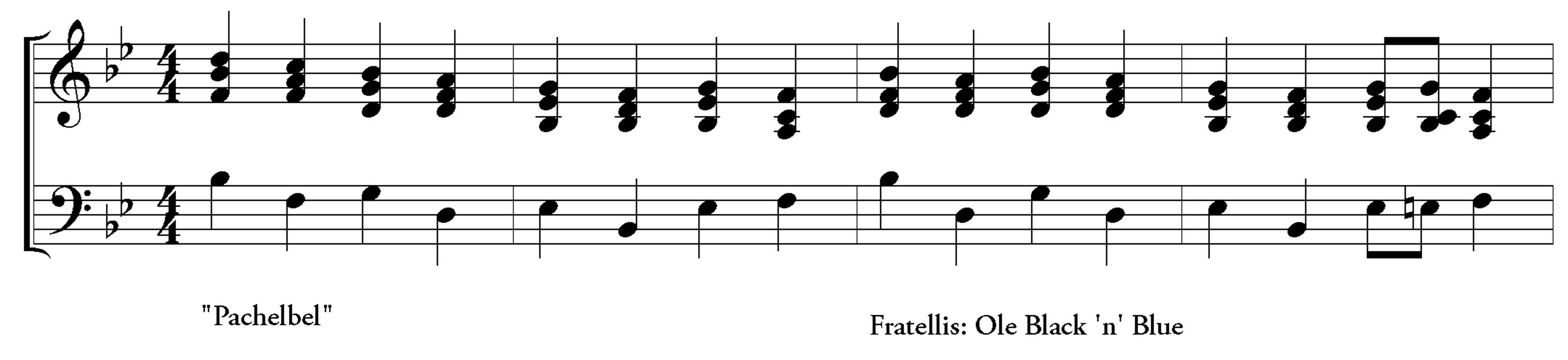 (Not sure if the right hand part matches the actual guitar parts used in the piece, but they're close enough for illustrative purposes).
But better than seeing similarities, I thought a little remix of the opening minute or so would show just how compatible the two pieces were. Enjoy.
The first thing that jumped out at me was how closely the progression of the song mirrored the Pachelbel Canon in D's ground bass (though transposed to B-flat):
(Not sure if the right hand part matches the actual guitar parts used in the piece, but they're close enough for illustrative purposes).But better than seeing similarities, I thought a little remix of the opening minute or so would show just how compatible the two pieces were. Enjoy.
And the original...
05 October 2008
Overwrite IE Favorites with Firefox Bookmarks
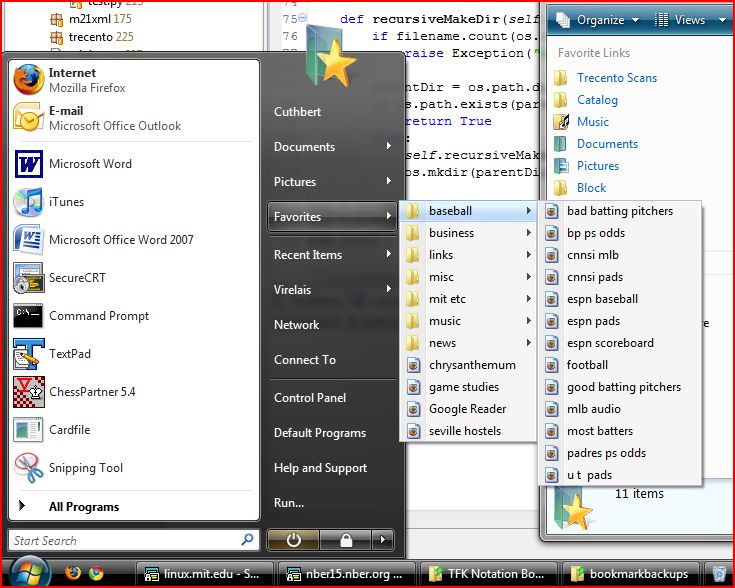
I love Firefox, but on Windows IE has one big advantage over it: it's made by the same people who made the OS. This lets IE access its favorites from all sorts of places, not just from the browser. I'm a task-oriented person rather than application-oriented: I tend to think "Gotta pay the bills now" not "Gotta open up the browser and then do things that require a browser, such as bill pay." IE 4.0+ (and Windows98) was oriented towards people like me, by putting the Favorites option in the start menu, every folder, etc. It never really caught on, and in fact the Favorites option was quietly removed from the start menu in either XP or Vista, though it can be re-enabled from the taskbar options.
There are a couple of ways to get your Firefox bookmarks in the Favorites. There are lots of bookmark synchronization programs, though they tend to need to be run manually--which is messy for me. There's also the PlainOlFavorites plug-in for Firefox which lets you just use IE favorites instead of Bookmarks. I loved this plug in for a few years, but I like FF's native Bookmark system enough that I wanted to make my own synchronization system.
Here's a little Python script I came up with. It copies YESTERDAY's Firefox backup over your Favorites (copying the current version would just have been too messy). It requires Python 2.6 or you'll need to install the "simplejson" module and replace all references to "json" with "simplejson" in the code. Do not run this if you use IE favorites: it will DELETE THEM ALL and overwrite them with Firefox favorites. You can comment out the "nukeFavorites()" line if you just want to add to your existing IE favorites. I plop this script into my Startup folder and it works great!
# bookmarks_json.py -- Michael Scott Cuthbert
import json
import copy
import sys
import os
import shutil

class BookmarkMaker(object):

    startdir = os.environ["USERPROFILE"] + r'\Favorites'
    internetShortcut = "[InternetShortcut]\nURL="

    folderpath = os.environ["APPDATA"] + "\\Mozilla\\Firefox\\Profiles\\"
    backuppath = r'\bookmarkbackups'

    def nukeFavorites(self):
        '''deletes everything in the Favorites dir -- do not use this if you update Favorites!'''
        nukeem = os.listdir(self.startdir)
        for thisfile in nukeem:
            if thisfile != "desktop.ini":
                thisFullFile = self.startdir + os.sep + thisfile
                try:
                    os.remove(thisFullFile)
                except OSError:
                    shutil.rmtree(thisFullFile)

    def run(self):
        stringFile = self.openRightFile()
        self.parse(stringFile)

    def openRightFile(self):
        backupPath = self.backupPath()
        theseFiles = os.listdir(backupPath);
        theseFiles.sort(reverse=True)
        for thisFile in theseFiles:
            if thisFile.startswith('bookmarks-') and thisFile.endswith('.json'):
                return self.openJson(backupPath + os.sep + thisFile)

    def backupPath(self):
        profile = self.mostRecentProfile(self.folderpath)
        return profile + self.backuppath

    def mostRecentProfile(self, profilesPath):
        '''returns the most recently modified Profile in the profilesPath'''
        newestName = ""
        newestTime = 0

        allDirs = os.listdir(profilesPath)
        for thisDir in allDirs:
            thisFullPath = profilesPath + os.sep + thisDir
            try:
                thisModTime = os.path.getmtime(thisFullPath + os.sep + "places.sqlite")
                if thisModTime > newestTime:
                    newestTime = thisModTime
                    newestName = thisFullPath
            except:
                pass
        return newestName

    def openJson(self, jsonFile):
        try:
            myfile = open(jsonFile) #folderpath + '\\' + bookmarkfile)
        except:
            raise Exception("Could not open file " + jsonFile)
        return myfile.read()

    def parse(self, stringData):
        self.jsonStuff = json.loads(stringData)
        self.realBase = self.findRealBase(self.jsonStuff)
        self.parseReally(self.realBase)

    def findRealBase(self, searchIn):
        return searchIn["children"][0]["children"]

    def parseReally(self, startingPoint, currentDir = []):
        for thing in startingPoint:
            if thing.has_key("children"):  ## Bookmark folder
                tempdir = copy.copy(currentDir)
                tempdir.append(thing["title"])
                self.parseReally(thing["children"], tempdir)
            elif thing.has_key("uri"):  ## Bookmark
                self.createFavorite(thing["uri"], os.sep.join(currentDir) + os.sep + thing["title"] + ".url")

    def createFavorite(self, uri, filename):
        shortcutOut = self.internetShortcut + uri
        if not(filename.startswith(os.sep)):
            filename = os.sep + filename
        filename = self.startdir + filename
        try:
            self.recursiveMakeDir(filename)
            filehandle = open(filename, "w")
            filehandle.write(shortcutOut)
        except:
            pass

    def recursiveMakeDir(self, filename):
        if filename.count(os.sep) > 12:
            raise Exception("Whoa, you sure you want to go so deep and make " + filename + "?")

        parentDir = os.path.dirname(filename)
        if os.path.exists(parentDir):
            return True
        else:
            self.recursiveMakeDir(parentDir)
            os.mkdir(parentDir)

if (__name__ == "__main__"):
    bmm = BookmarkMaker()
    bmm.nukeFavorites()
    bmm.run()
Subscribe to:
Posts (Atom)